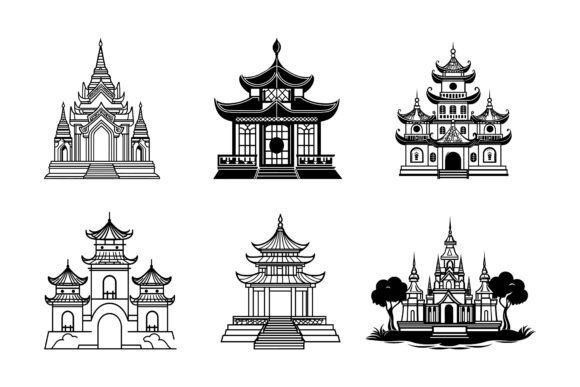
Temples and Manor Houses Illustration Set
Imagine having a ready-to-use library of detailed vector artwork that captures the timeless elegance of temples and stately manor houses. Such a collection exists, delivered in industry-standard AI and EPS formats alongside convenient JPG previews. Whether you craft travel blogs, design business collateral, or teach historical architecture, these illustrations provide a solid foundation. They arrive with a clean file structure that works on both Mac and Windows, making them immediately accessible regardless of your setup.
The true value of a well-prepared illustration set lies not only in the artwork itself but in how seamlessly it integrates into different creative workflows. A blogger racing to publish a post needs quick, web-ready images, while a brand designer demands editable vectors that can scale from a business card to a billboard without losing detail. This collection addresses both extremes by including multiple formats that are purposefully organized. The AI and EPS files retain full vector editability, letting you recolor a manor’s facade or adjust line weights with ease. Meanwhile, the high-resolution JPGs let you drop artwork into slide decks, website mockups, or social media templates without ever opening professional design software.
Inside the File: What You Actually Receive
Before diving into uses and audiences, it helps to understand exactly what the package offers. The creators have prioritized a tidy, logical structure that saves you from digging through unnamed layers or misaligned groups. Here is what you get:
- AI and EPS formats – fully editable vector files compatible with Adobe Illustrator, CorelDRAW, Affinity Designer, Inkscape, and similar applications.
- JPG images – raster versions at a generous resolution for quick previews, web publishing, or placement in documents.
- Mac and Windows support – the files are saved in cross-platform formats and use universal naming conventions, so you won’t face opening errors on either operating system.
- Neatly organized layers – each illustration has its elements grouped logically. You can isolate a temple colonnade, a manor’s chimney, or background foliage with a single click, then edit or hide them independently.
- Consistent detailing – line weights, shading, and overall proportion remain uniform across the entire collection, which means when you combine multiple illustrations in one project, they look like they belong together.
- Print and digital suitability – the vector files produce crisp output at any resolution for print materials, while the JPGs are ideal for screen-based projects, apps, or infographics.
Why Temples and Manor Houses Illustrations Matter Across Projects
Architectural imagery carries deep associations. A temple often suggests spirituality, ancient wisdom, or ritual, while a manor house evokes heritage, stability, and quiet grandeur. Using such visuals in your work can instantly set a tone that flat icons or generic stock photos might not achieve. That emotional pull matters whether you are building a wellness app, designing a real estate brochure, or illustrating a history lesson. The same set can serve remarkably different purposes depending on who is holding the mouse.
For a small business owner who runs a countryside inn, a simple silhouette of a grand manor on a sign or website header communicates exactly what guests can expect. For a content creator making a video about architectural styles, being able to pull apart the layers of a temple illustration to highlight its structural parts adds educational value. The versatility comes not just from the subject matter, but from how the files allow you to remix the visuals to fit a narrow niche.
Different Users, Different Priorities
People come to a resource like this with varied skill levels, budgets, and end goals. Someone just starting out might feel intimidated by advanced vector editing, while a seasoned illustrator demands pixel-perfect precision. Recognizing those differences helps you decide if this collection aligns with your own situation.
Beginners and hobbyists often prioritize ease of use and immediate results. The included JPGs mean you can start using the images seconds after downloading. Even if you have never touched Illustrator, you can insert them into a Canva design, a Word document, or a scrapbooking layout. The organized layer structure also offers a gentle learning curve for those who want to dip a toe into vector editing—because layers are clearly labeled, you spend less time guessing and more time creating.
Freelancers and solo entrepreneurs usually balance quality with speed. When you wear all the hats, you can’t afford to spend three hours drawing a temple for a client’s event poster. This set lets you pull a professionally crafted illustration, adjust its colors to match the brand palette, and present it confidently. Because the files are well-structured, you won’t waste time fixing stray anchor points or cleaning up messy artboards. The cross-platform compatibility also means you can collaborate with clients who use Mac while you work on Windows, without conversion headaches.
Educators and publishers look for accuracy and clarity. A history textbook or a museum display panel needs illustrations that are detailed enough to be informative but clean enough to reproduce well in print. The consistent detailing in these files means a temple’s steps look proportionate next to a manor’s doorway. Furthermore, because you can turn individual layers on and off, you can create simplified versions of the same image for different formats—a complex cutaway for a print handout and a minimalist line version for an interactive whiteboard.
Marketing professionals and business owners frequently think in terms of scalability and reuse. A brand identity might need the same manor icon on a website, mobile app, packaging, and social media avatars. Vector files ensure that icon stays razor-sharp at any size. The ability to recolor the artwork means you can adapt it for seasonal campaigns without commissioning new assets. Having both AI and EPS formats broadens compatibility with different printers and agency workflows, which reduces friction when deadlines are tight.
Editing with Confidence: Modifying Colors, Shapes, and Details
One of the standout features highlighted by the creators is how easily you can edit the illustrations. This goes beyond simple recoloring. Because every element resides on its own layer, you can change the color of a temple’s roof without affecting the columns, or swap the facade of one manor for another to create a custom composite. Beginners can use global color swatches in Illustrator to apply quick theme changes, while more advanced users can alter paths directly to reshape a spire or extend a garden path.
Editable vectors also mean you can scale the artwork infinitely. If you are working on a large-format print like a trade show banner, the manor house won’t develop jagged edges. If you need a tiny app icon, the temple silhouette remains recognizable. The prepared file organization reduces the time you’d otherwise spend hunting for the correct group or layer, which is a subtle but powerful form of time-saving that experienced designers appreciate.
Real-World Scenarios Where These Illustrations Shine
Thinking concretely about how different people might deploy the artwork can clarify whether it matches your project. Here are a few examples that show the range without exhausting every possibility.
Travel blogger crafting destination guides. You want to illustrate an itinerary through the Cotswolds or a temple trail in Kyoto. Instead of relying on stock photos that look like everyone else’s, you grab this set. You tint the manor house illustrations a warm sepia for a vintage feel and place them as chapter headers. The JPG versions load quickly on your mobile-responsive site, keeping your page speed snappy.
History teacher preparing a digital handout. You need clear line drawings of a Greek temple and an English manor to compare classical and Georgian architecture. You open the AI file, remove the background layer, and export a clean black-and-white diagram. You then highlight different architectural features in contrasting colors and add labels. The consistent level of detail makes your handout look professional, even though you spent only minutes customizing it.
Freelance designer working on a heritage society’s anniversary logo. The brief asks for a sophisticated symbol that references local landmarks. You choose a manor house illustration, simplify its silhouette further by deleting minor decorative layers, and surround it with a circular typographic layout. The client receives a scalable vector logo that works on everything from letterheads to embroidered apparel. Because the original file was so well structured, the refinement process was fast and your margins stayed healthy.
App developer creating a mindfulness application. You want a series of calming architectural icons for guided meditation categories—temples for “Inner Sanctuary,” manor houses for “Stillness Retreat.” You modify the color palette to soft pastels, thin out the stroke weights slightly, and output PNGs from the vector source. The consistency across icons reinforces the app’s cohesive look, and the editability means you can easily create a dark-mode variant later.
Small business owner running a bed and breakfast. You need a versatile visual for your website, booking platform, and roadside sign. You choose a manor illustration that resembles your property, adjust the roof color to match your actual slate tiles, and use it as a logo mark. The vector file gives your local print shop exactly what they need, and the JPG is perfect for your online listing. No need to hire an illustrator for a custom piece.
Is This the Right Resource for Your Needs?
With so many illustration resources available, it helps to have a straightforward way to assess fit. This collection is likely a strong match if you value flexibility, editability, and time savings. The combination of AI, EPS, and JPG formats covers most common design and publishing tasks without requiring specialized conversion software. If you often need architectural motifs that are detailed yet adaptable—and you want to avoid starting from scratch or settling for generic clip art—these illustrations fill that gap neatly.
On the other hand, if your project demands photorealistic 3D renders or highly stylized whimsical drawings, you may need a different asset type. This set delivers clean, proportional, semi-realistic line and shape artwork that leans toward classic representation. That makes it particularly suitable for educational, branding, and editorial use where clarity matters more than artistic exaggeration.
Beginners will find a gentle entry point thanks to the ready-to-use JPGs and the organized layers that demystify vector structure. Professionals will value the precision and the fact that no time is wasted cleaning up poorly constructed files. No matter your skill level, having a resource that is prepared for both Mac and Windows removes a common friction point that can derail a tight deadline.
Ultimately, the illustrations serve as a bridge between concept and finished product. Rather than spending hours drawing a temple from reference photos, you can focus on how the image interacts with your layout, message, and audience. That shift—from manual creation to intentional design—can make your final work more cohesive and your process more enjoyable.
The collection’s strength lies in its combination of thoughtful file architecture, aesthetic consistency, and platform flexibility. Whether you are a blogger capturing the spirit of historic travel, a teacher illuminating the past, or an entrepreneur branding a hospitality venture, having such assets at your fingertips lets you execute your vision with less friction. The artwork is ready for you to mold it to your specific needs, which is exactly what a well-designed illustration set should do.